Custom Bard buttons can be added conditionally#4106
Conversation


Custom buttons, that have been added to bard using

  Statamic.$bard.buttons( ... )

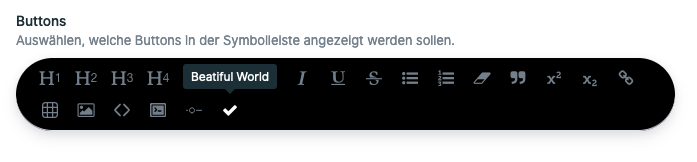
will now be shown in the Blueprint editor, to enable or
disable them for a specific field.
Custom buttons that have not been selected in the blueprint editor
to be available for that field will now get hidden. However, this will
only happen if you return an array of button in the $bard.buttons callback
and not if you manipulate the buttons array directly.

The Statamic.$bard.buttons callback handler receives a new property `selectedButtons`.
This array of strings contains the selected buttons of the current field. The argument
will be undefined when being called from the blueprint editor, so that you can
distinguish whether you should add a button or not.

Example:

Statamic.$bard.buttons((buttons, selectedButtons) => {
    if (!selectedButtons || selectedButtons.includes('lead')) {
        buttons.push({
            name: 'lead',
            text: 'Lead Text',
            command: 'lead',
            icon: 'lead',
            component: LeadButton,
        });
    }
});

However, if you simply return an array of buttons bard will take care of the visible
state itself. This is meant for backwards compatibility reasons.

|
What's the purpose of the new |

This is more like backwards-compatibility issue. The So in case 1 all buttons should be shown. In case 2 only the selected buttons from 1) should be shown. However, this is not a problem, as long as you return an array of buttons that should be added, because they will be filtered out automatically according to their availability state. But there is the possibility to directly manipulate the When you look at https://statamic.dev/extending/bard#buttons the reference manipulation is one of the examples. Maybe I can fix this, so it is not necessary to do this extra check. |
|
Thanks for this PR, and sorry for the delay on it. The way you had it was a breaking change. If you didn't have the button configured in the What I've done is introduce a When we use the callback in the fieldtype, it'll filter itself out if it's not configured in the buttons array. Statamic.$bard.buttons((buttons, button) => {
return button({ name: 'bold' });
// or multiple...
return [
button({ name: 'bold' }),
button({ name: 'italic' }),
];
});People using the existing way, where you return an object or an array of objects, it'll continue to add the button to all fields. If they want to start making it conditional, they can just wrap their object in I also removed the css change, it was a bit buggy in the regular fieldtype. Feel free to open a separate issue or PR for that. |
…ly and they return null, they'll get filtered out too
 jasonvarga
changed the title
jasonvarga
changed the title

2 participants


When adding custom buttons to bard using
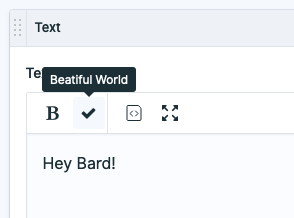
the buttons will be available in any bard instance, without the possibility to disable them in the blueprint editor. This PR adds the option to enable or disable custom buttons from addons or the project for each fieldtype config.
Blueprint Editor:
Bard Instance:
Javascript Usage:
Closes #2340